support@dragon-dealz.com
 +1 (888) 303-8337








Introduction
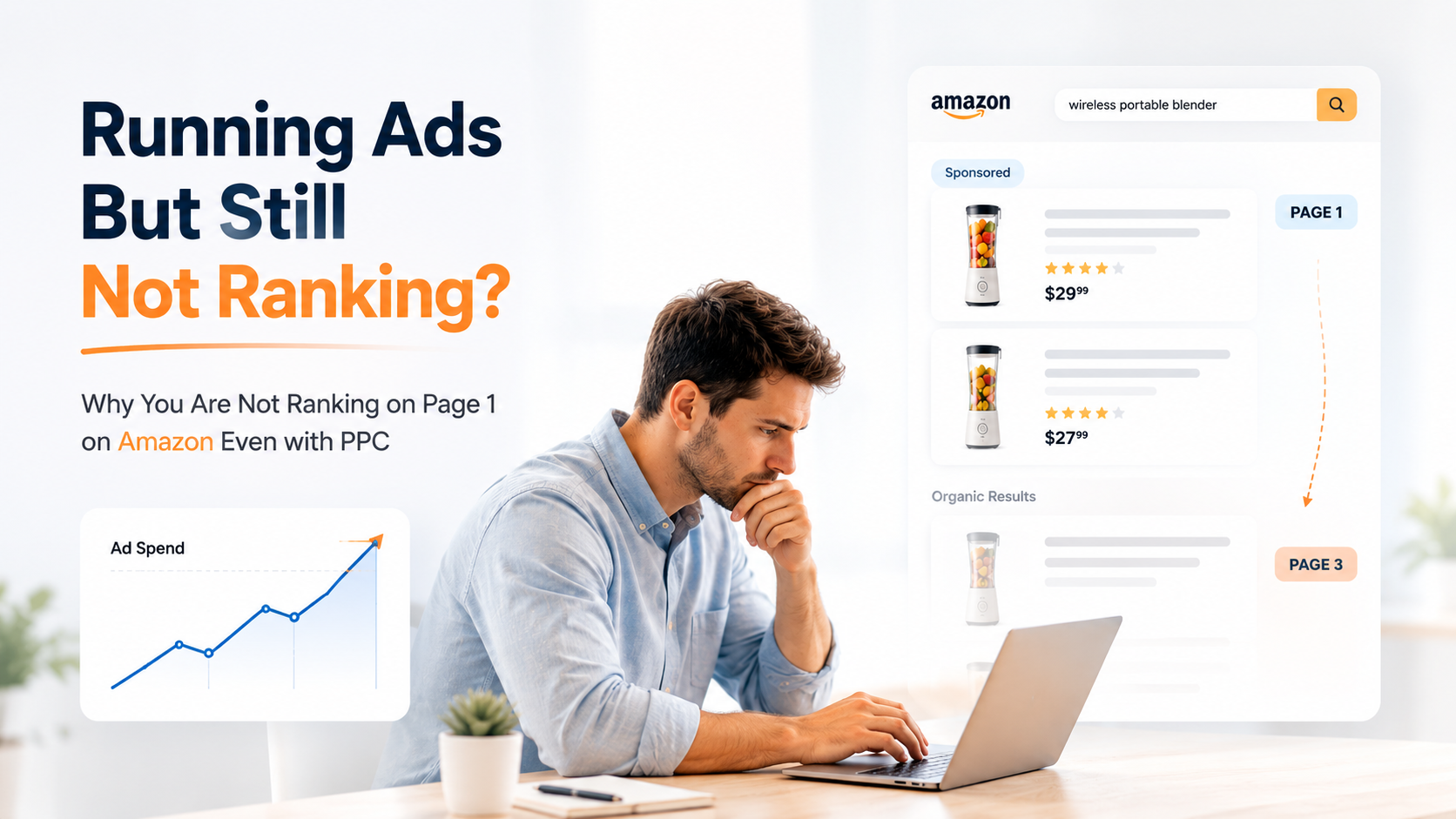
You’re running ads. You’re spending real money. And your product is still sitting on page 3.
That’s the part that stings. Because PPC is supposed to help. Every course, every YouTube video, every Amazon guru says the same thing: run ads, get sales, rank organically. So you did. And it’s not working.
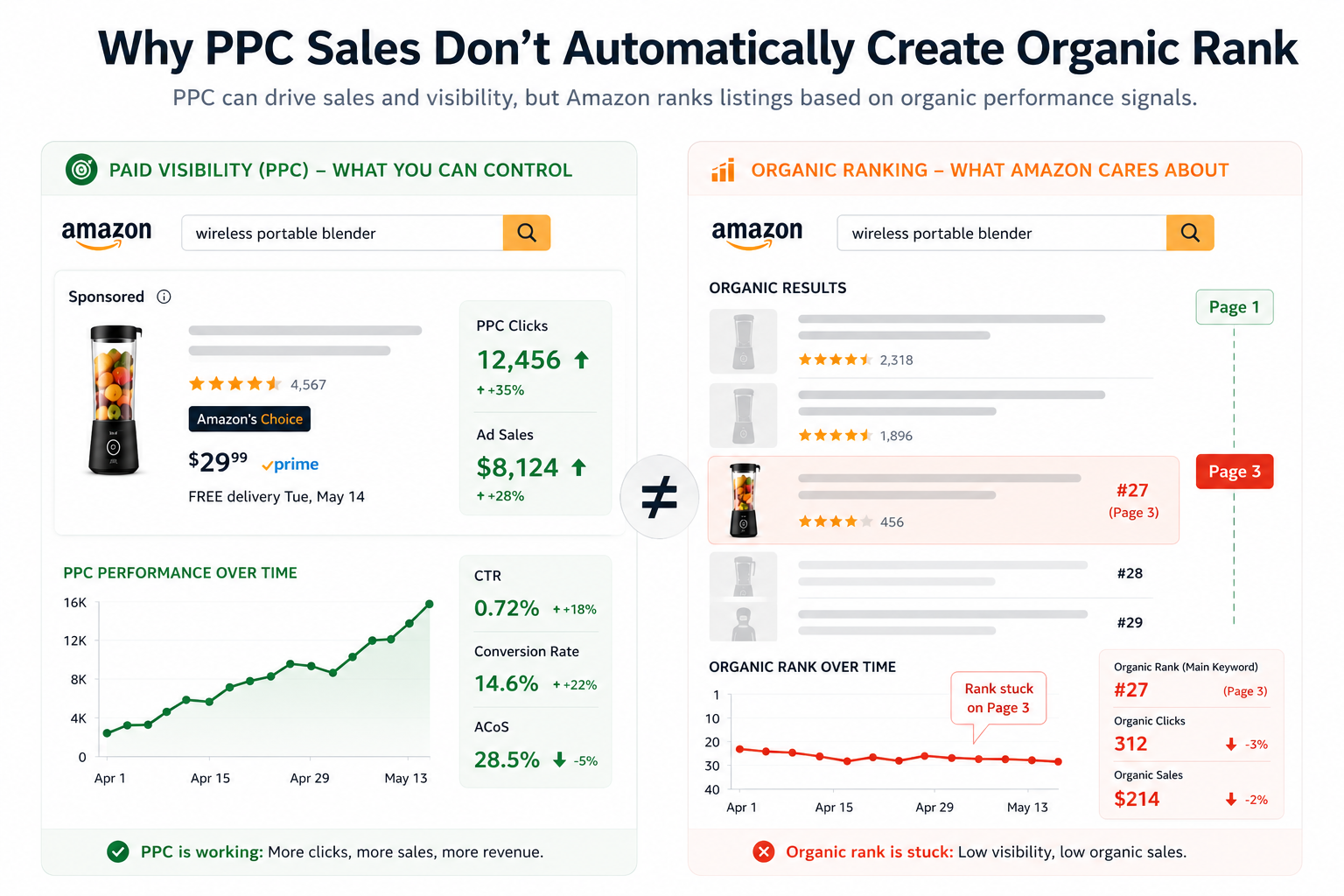
Here’s what’s actually going on. PPC and organic ranking on Amazon are two different games. Ads can get you impressions. They can even get you sales. But they don’t automatically translate into page 1 organic rank, and if you’re trying to figure out how to rank on page 1 of Amazon, you need to understand why.
This page will walk you through the real reasons your product isn’t ranking, what Amazon’s algorithm actually responds to, and the steps that move the needle.
Is This You? Quick Self-Diagnosis
If any of these sound familiar, you’re in the right place:
- You’re running PPC every day, but still not ranking on page 1 of Amazon
- Your listing is stuck on page 2 or 3, no matter how much you bid
- Ad sales are coming in, but your organic rank won’t budge
- You can’t get your product to page 1 even after weeks of campaigns
- Your TACoS is high and climbing, but total revenue is flat
- You’ve optimized your listing, but nothing seems to change your organic position
- Competitors with fewer reviews are outranking you organically
If two or more of these describe your last 30 days, keep reading. The fix is specific, not random.
Why You’re Not Ranking on Page 1 Amazon: The Real Causes
Forget the generic advice. There are three specific reasons a listing stays stuck even when PPC is running. Almost every seller we diagnose falls into one of these, sometimes two stacked on top of each other.
Cause 1: PPC Sales Alone Don’t Build Organic Rank (Visibility)
This is the biggest misunderstanding in Amazon sales. Sellers assume that more ad sales = better organic rank. Amazon’s A9 algorithm doesn’t work that way.
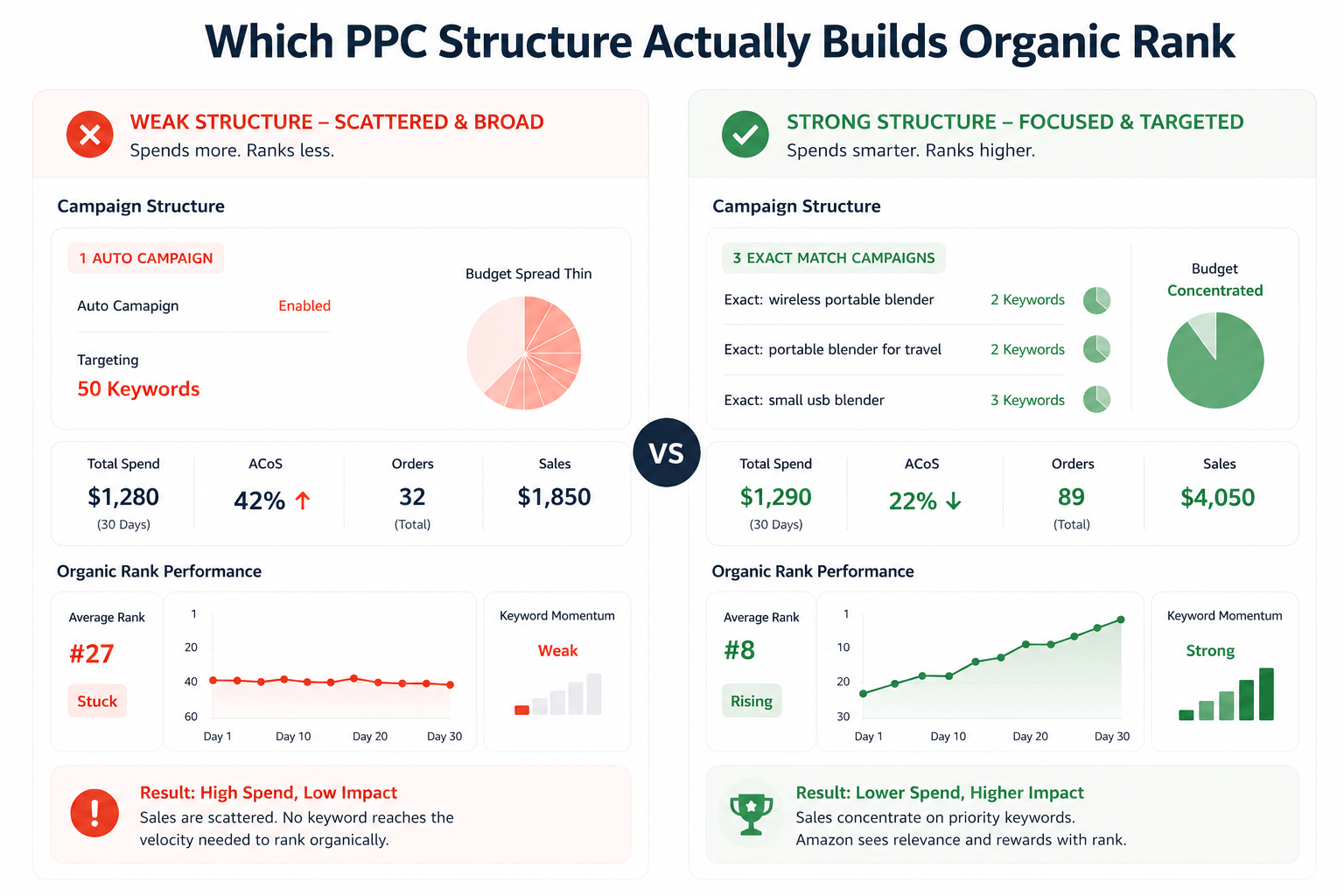
What the algorithm actually measures is sales velocity relative to your keyword, not just your total sales volume. If your ad-driven sales are scattered across 40 different keywords, none of them reach the velocity threshold that triggers a rank push on any single term.
In other words, 50 sales spread across 50 keywords does almost nothing for your organic rank. 50 sales concentrated on 3 keywords can move you from page 3 to page 1 in two weeks. That’s a completely different strategy than what most sellers are running.
Quick Diagnosis: Pull your Search Term Report. If your PPC sales are spread thin across dozens of terms with no single keyword getting more than 2-3 orders per day, that’s your problem.
Cause 2: Your Conversion Rate Is Dragging Down Your Rank (Conversion)
Amazon rewards listings that convert. That’s the core logic of the algorithm. If buyers are clicking your listing and not buying, Amazon reads that as a signal that your product doesn’t match what the buyer wanted.
Here’s where it gets painful: you can run ads, drive traffic, and actually hurt your organic rank if your conversion rate is low. Every low-converting click tells the algorithm that your listing is a weak match for that keyword.
Most sellers focus entirely on getting more traffic. But if your unit session percentage is below 10%, more traffic just proves the problem. Fix the conversion first, then push the traffic.
Cause 3: Your Listing Isn’t Indexed for the Keywords You’re Running Ads On (Indexation)
This one catches a lot of sellers off guard. If your listing isn’t properly indexed for a keyword, running ads on that keyword won’t help your organic rank for it, even if you get sales.
Amazon can only credit organic rank signals to keywords your listing is indexed for. If that keyword isn’t in your title, bullet points, backend search terms, or A+ content, the algorithm doesn’t connect the dots.
Run a quick indexation check. Search your ASIN + a specific keyword in Amazon’s search bar (format: ASIN keyword). If your listing doesn’t appear, you’re not indexed. No amount of PPC will fix that.
Cause 4: Your Click-Through Rate Is Too Low (Visibility + Conversion)
CTR is the step before conversion, and it matters for organic ranking too. If buyers are scrolling past your listing in search results without clicking, Amazon takes note.
A weak main image, an uncompetitive price, or a generic title will tank your CTR even when you’re on page 1 for a short window. And a low CTR listing gets demoted fast, because the algorithm sees it as a poor fit for the search result.
Check your Sponsored Products CTR in your ad reports. If it’s below 0.3%, your main image or title is likely the problem, not your bid strategy.
What Staying on Page 3 Is Actually Costing You
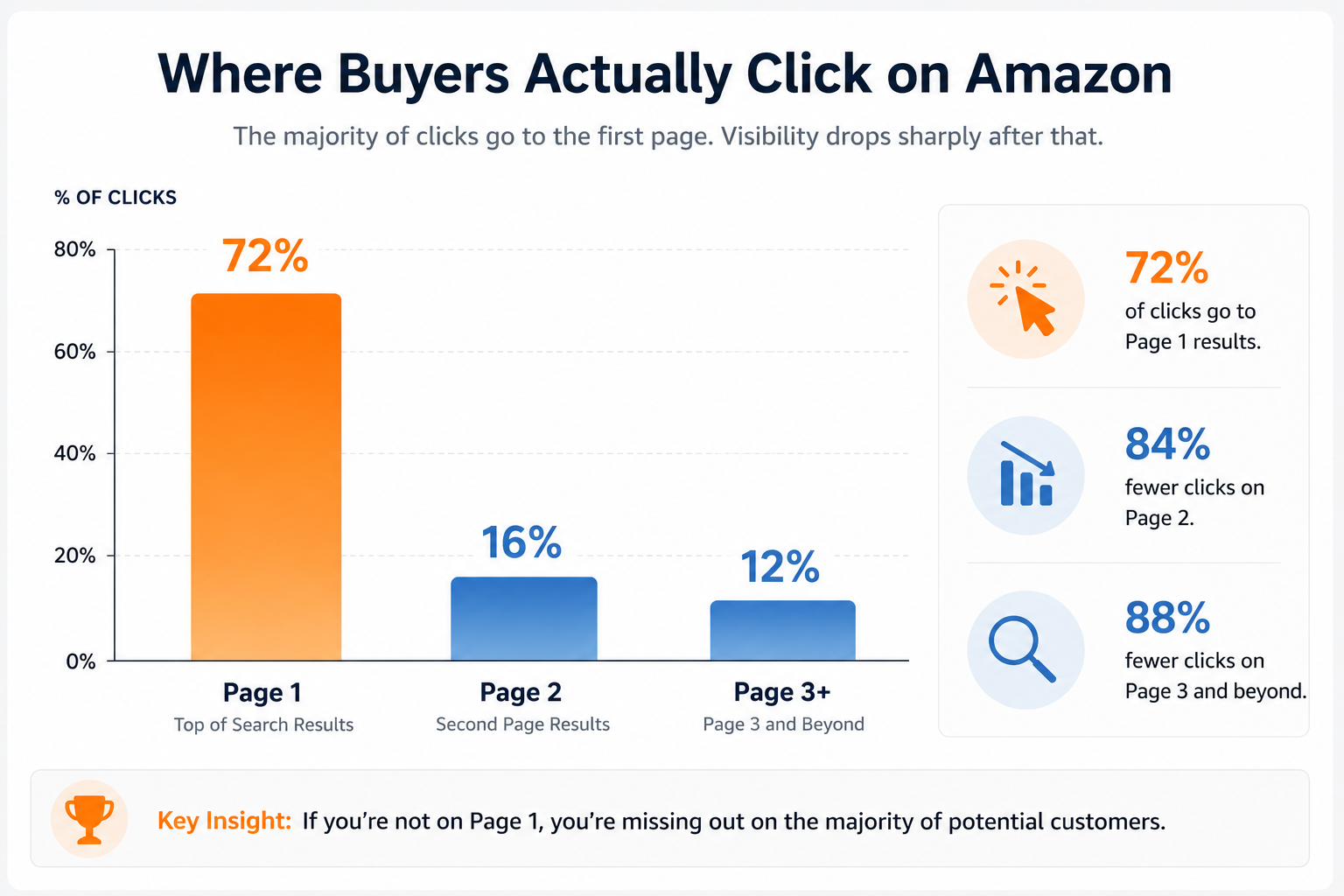
Let’s put a number on it. Studies consistently show that over 70% of Amazon clicks happen on page 1. If you’re on page 3, you’re invisible to the vast majority of buyers who search your keyword.
Say your product does 20 sales a day when you’re running ads. If you cracked page 1 organically and cut your ad spend in half, you could be doing 35-45 sales a day at a much lower TACoS. That’s not a small difference. That’s the gap between a struggling product and a profitable one.
And there’s a compounding cost most sellers don’t think about. Every week you stay on page 3, a competitor on page 1 is building their review count, their sales history, and their rank authority. Getting past them gets harder the longer you wait.
How to Rank on Page 1 of Amazon: The Fix Sequence
There’s no shortcut here, but there is a sequence. And the sequence matters. Most sellers try to do everything at once and can’t tell what worked. Do this in order.
Step 1: Fix Your Indexation Before Touching Your Ads
Before you spend another dollar on PPC, confirm that your listing is indexed for the keywords you actually want to rank for. Check your top 5 target keywords using the ASIN + keyword method in Amazon search.
If you’re missing indexation on any of them, update your title, bullet points, and backend search terms. This step takes an hour and can unlock rank movement that months of ad spend couldn’t produce.
Step 2: Audit Your Conversion Rate
Pull your unit session percentage from Business Reports for the last 30 days. If it’s below 10%, fixing conversion is your top priority before anything else.
Start with your main image. Open Amazon and search for your primary keyword. Look at the search results page as a buyer would, not as a seller. Is your image the one you’d click? Compare it honestly against the top 3 results.
Then check your price against the top 5 competitors. If there’s a meaningful gap and your review count is lower, that’s a barrier. You don’t have to slash your price permanently, but a short pricing test gives you data.
Step 3: Concentrate Your PPC on 2-3 Target Keywords
Once indexation and conversion are solid, restructure your PPC to focus. Pick your 2-3 most important keywords and put most of your budget behind them in exact match campaigns.
The goal is to drive enough concentrated sales velocity on those specific keywords.
Amazon’s algorithm notices the pattern and starts crediting you with organic rank. Spreading your budget thin across 50 broad match terms does the opposite.
Run this focused campaign for 3-4 weeks without major changes. Give the algorithm time to register the signal.
Step 4: Track Organic Rank Separately from Ad Rank
Most sellers look at their ad metrics and assume rank is improving. Check your actual organic rank using a tool like Helium 10, Data Dive, or a manual logged-out browser search. Your ad rank and organic rank are different positions.
Track organic rank for your top 3 keywords weekly. You’re looking for gradual movement, a shift from position 28 to 18 to 11 to 7 over 6-8 weeks. If it’s not moving after 4 weeks of concentrated campaigns, revisit your Amazon conversion rate or indexation before adding more budget.
Step 5: Protect the Rank Once You Have It
Getting to page 1 is one challenge. Staying there is another. Once you hit page 1, don’t immediately cut your PPC. Organic rank on Amazon isn’t static; it responds to ongoing sales velocity.
Reduce ad spend gradually over 2-3 weeks while monitoring organic rank. If you cut too fast and the velocity drops, you’ll slide back. The goal is to wean the listing off paid support while the organic rank holds on its own momentum.
How to build long-term organic ranking on Amazon
What Most Sellers Miss About Ranking on Amazon
Insight 1: TACoS Is Your Real Ranking Health Indicator
Most sellers watch ACoS (Advertising Cost of Sales). But TACoS (Total Advertising Cost of Sales, calculated as ad spend divided by total revenue) tells the more important story.
If your TACoS is dropping over time while total sales hold steady, it means your organic sales are growing and carrying more of the revenue load. That’s the sign of a Amazon listing that’s actually ranking and building momentum.
If your TACoS is climbing month over month, you’re propping up sales entirely with paid traffic. Your organic rank is either flat or decaying. More ad spend in that situation makes the problem worse, not better.
Key Insight: A healthy TACoS trend (declining over 60-90 days) is a stronger signal that your ranking strategy is working than any individual keyword movement.
Insight 2: Review Velocity Matters More Than Review Count
A listing with 600 reviews but none in the last 30 days is losing ground to a listing with 80 reviews and 8 coming in per week. Amazon’s algorithm reads recent review velocity as a signal of current relevance.
This catches a lot of established sellers off guard. Your review count looks strong in absolute terms, but if the velocity has dried up, the algorithm is quietly treating your listing as fading. Getting more reviews into the recent window is part of how you build and sustain organic ranking on Amazon.
When It Makes Sense to Get Help
If you’re past $20k per month in revenue, the math on staying stuck is brutal. Every month on page 3 is a month your competitor on page 1 is building a lead you’ll have to fight twice as hard to close.
The tactical steps above work. But executing them in the right sequence, diagnosing the actual bottleneck, and running a coordinated push across indexation, conversion, and PPC concentration at the same time, that’s where most sellers lose time doing it solo.
If you’d rather have someone diagnose the exact cause and run the fix, that’s what a full Amazon listing and ranking service is for.
Explore listing and ranking support
FAQ
Running Amazon
PPC alone doesn’t guarantee a page 1 ranking. You also need strong conversion rates and focused sales velocity on target keywords.
Most keywords take 4–8 weeks to rank with solid campaigns and conversion. Competitive keywords can take 10–16 weeks.
Usually, it’s low conversion, weak keyword focus, or poor indexation. Check those before increasing ad spend.
Yes, indirectly. PPC helps organic rank by increasing sales velocity, but only if clicks and conversions are strong.
Improve indexation, images, titles, and focus ad spend on fewer high-priority keywords. Better efficiency beats higher spend.
The Bottom Line
If you’re not ranking on page 1 of Amazon despite running ads, the problem isn’t your budget. It’s almost always one of three fixable things: keyword indexation gaps, a conversion rate the algorithm doesn’t trust, or PPC spending spread too thin to build velocity where it counts.
Diagnose the actual bottleneck first, then fix it in sequence. Once the foundation is right, a focused 4-6 week push can move a listing from page 3 to page 1. If you want help identifying which problem is yours and running the fix,