support@dragon-dealz.com
 +1 (888) 303-8337








Introduction
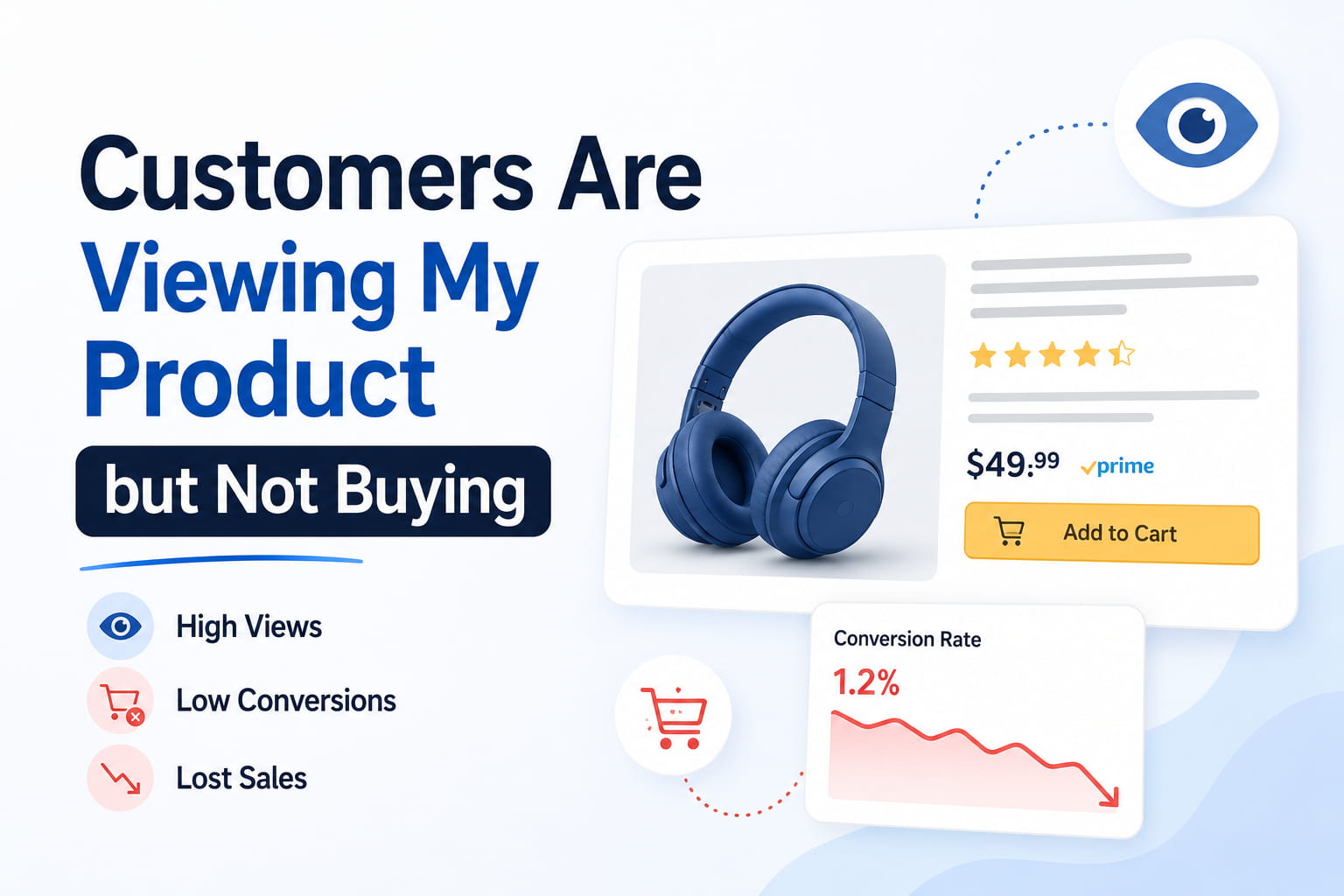
The traffic is there. Sessions are coming in. People are finding your listing, clicking through, and landing on your product page.
And then they leave.
No add to cart. No purchase. Just a visit that cost you either ad spend or organic rank momentum and produced nothing in return.
If you’re dealing with a situation where customers are viewing your product but not buying, the instinct is usually to run more ads, lower the price, or refresh the listing copy. Sometimes one of those is the right move. Most of the time, the real problem is more specific than any of those general fixes address, and without identifying exactly where in the buyer decision process the drop-off is happening, any change you make is essentially a guess.
This page breaks down the exact stages where buyers abandon Amazon product pages, what’s causing each type of drop-off, and how to fix the right problem in the right order.
What Your Data Is Actually Telling You
Before changing anything on your listing, pull one number from Business Reports in Seller Central.
Go to the Detail Page Sales and Traffic by Child Item. Look at your Unit Session Percentage, the percentage of listing visits that resulted in a purchase.
Here’s how to read what you find:
- Above 15%: strong conversion, the listing is working well for the traffic it’s receiving
- 10% to 15%: healthy range for most categories, room for incremental improvement
- 6% to 10%: below average, a specific listing element is creating friction
- Below 6%: significant conversion problem, multiple elements likely need attention
- Below 3%: severe conversion failure, usually a combination of trust, price, and relevance issues
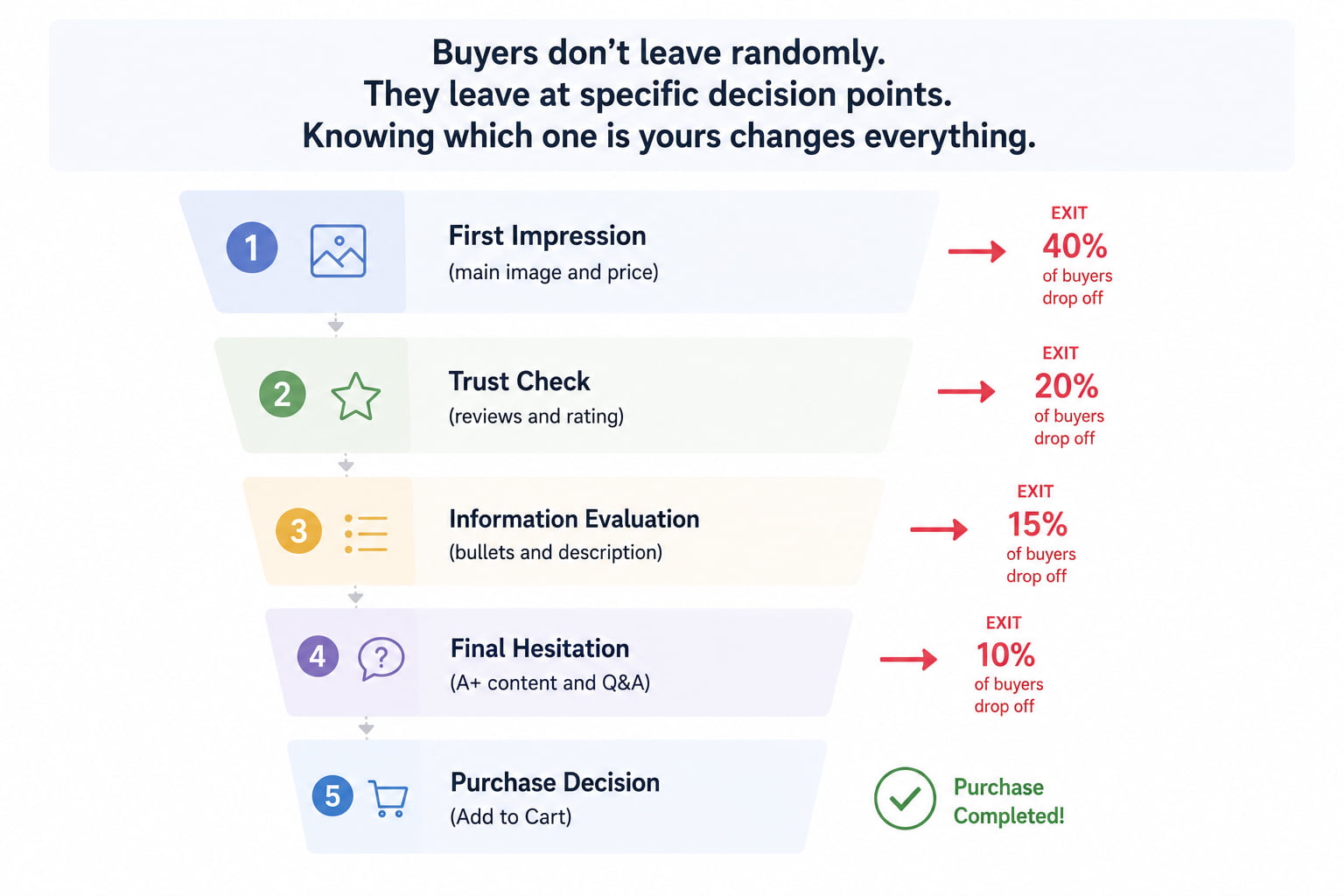
Now look at your traffic source. If sessions are coming primarily from broad-match or auto-campaign PPC keywords, part of the problem may be traffic quality and the wrong buyers arriving at the listing. If sessions are from exact-match campaigns on your core keywords and the unit session percentage is still low, the listing itself is the bottleneck.
That distinction matters because Amazon traffic, but no sales from irrelevant ad traffic, is a campaign problem. The same symptom from targeted traffic is a listing problem. Both look identical in the session count. Only the source data separates them.
Why Customers Are Viewing Your Product but Not Buying — The Real Causes
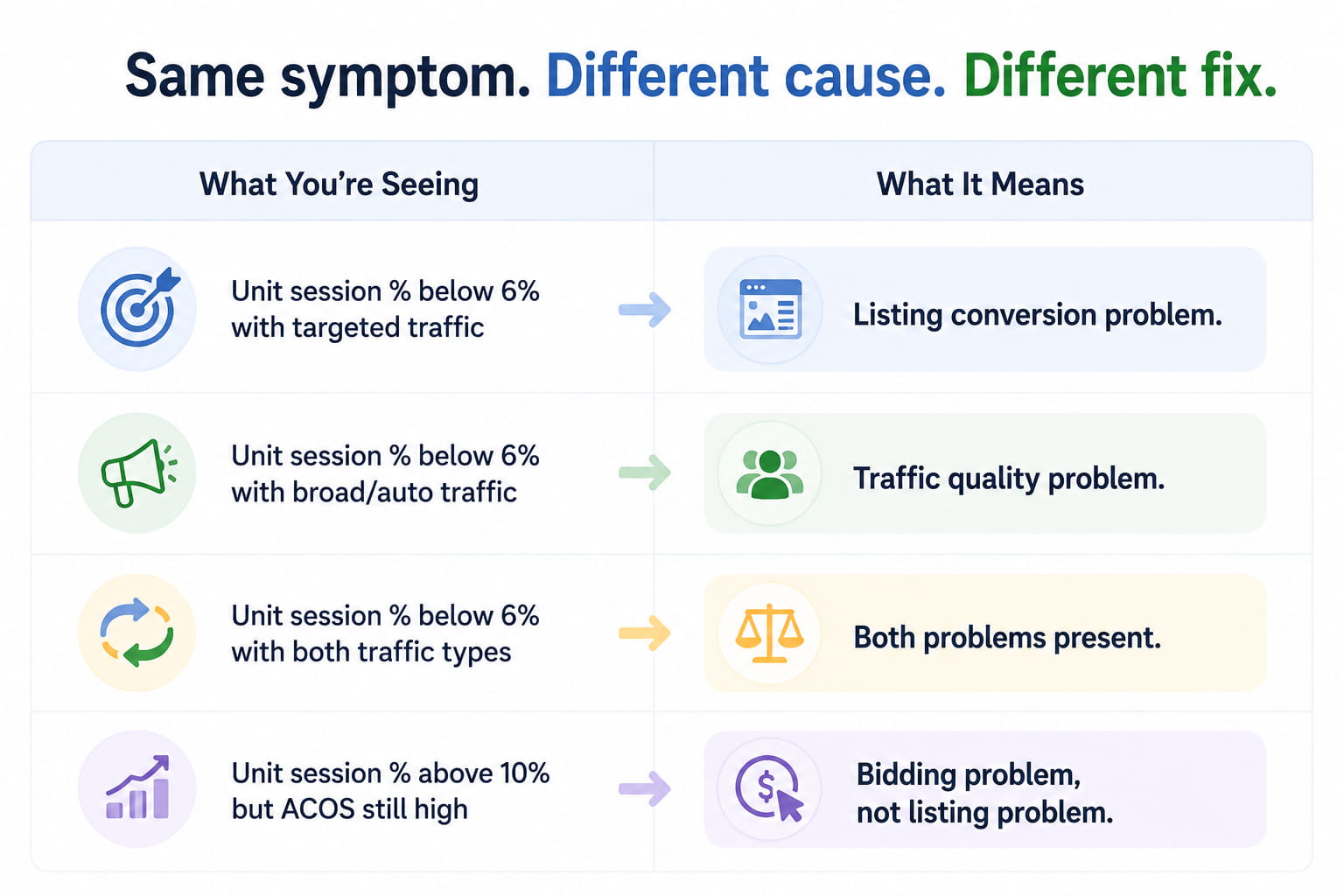
The buyer journey on an Amazon product page has five distinct decision stages. Most conversion problems sit at one or two of them. Identifying which stage your listing is losing buyers at is what makes the difference between a targeted fix and an expensive guessing game.
Cause 1 – The First Impression Isn’t Compelling Enough (Main Image Problem)
The main image is the first thing a buyer evaluates when they land on your listing, and it also determines whether they clicked through from the search results in the first place. If the main image looks amateur, unclear, or less polished than competitor images at thumbnail size, buyers lose confidence in the product before reading a single word of copy.
This is the earliest and most impactful drop-off point in the conversion funnel. A buyer who arrives with low confidence from a weak first impression is already predisposed to leave. Every other element of the listing has to overcome a deficit that the main image created.
Check your main image by searching your primary keyword in incognito mode. Look at the full search results row honestly:
- Does your product look as professional and compelling as the top 3 results at thumbnail size?
- Is the background genuinely pure white, or does it look slightly grey or off-white?
- Is the product filling the majority of the frame, or does it look small and distant?
- Are there any props, text overlays, or lifestyle elements that create visual clutter?
If the main image doesn’t hold up in that comparison, it’s your first fix regardless of anything else on the page.
Cause 2 – The Price Creates Immediate Friction (Price Problem)
Amazon buyers almost always have multiple options visible simultaneously. When your price is noticeably higher than comparable products on the same search page, you’re asking the buyer to justify paying more for a product they don’t know yet from a seller they haven’t bought from before.
Most buyers won’t do that work unless your listing gives them a very compelling reason to. A stronger main image, significantly more reviews, or a noticeably better product story can justify a price premium. But if your pricing is 20% above the page average with a similar or lower review count, the price is almost certainly contributing to your Amazon conversion issues.
Search your keyword in incognito. Note the prices of the top 5 organic results. If your price sits significantly above the page average, that gap is visible to every buyer and factored into every purchase decision they make on that page.
Cause 3 – Reviews and Star Rating Aren’t Building Enough Trust (Social Proof Problem)
After the first impression and price, the next thing most buyers check is reviews. Review count and star rating are the primary trust signals Amazon buyers use to evaluate an unfamiliar product from an unfamiliar seller.
High sessions, low orders caused by a social proof gap show up clearly when you compare your review count and star rating to the top 3 competitors on your primary keyword page. If competitors have 200 to 500 reviews at 4.4 stars and you have 18 reviews at 3.9, the trust gap alone can explain most of your conversion shortfall.
Specific social proof issues that cause Amazon shoppers to not convert:
- A star rating below 4.0 raises immediate buyer hesitation, regardless of review content
- Review count in single or low double digits makes the rating statistically unreliable to buyers
- No recent reviews, even a 4.5 rating, with the last review dated 8 months ago, signal inactivity
- Unanswered negative reviews that suggest the seller doesn’t engage with customer problems
Cause 4 – Bullet Points List Specifications Instead of Resolving Hesitations (Copy Problem)
Most Amazon bullet points do the same thing: they describe the product. Materials, dimensions, compatibility, and what’s included in the box. That information matters, but it doesn’t answer the question that’s actually driving the buyer’s hesitation — which is whether this specific product will solve their specific problem better than the alternatives next to it.
Amazon product page not converting because the copy is identifiable when session time appears reasonable (buyers are reading the page), but add-to-cart rates are still low. The buyer was interested enough to read. The copy didn’t resolve their hesitation enough to commit.
Rewrite each bullet to lead with the outcome the buyer wants, not the feature you’re proud of:
- “Reinforced stitching throughout” becomes “Holds up after two years of daily use, no fraying, no loose threads, no replacement costs.”
- “10,000mAh battery capacity” becomes “Charges your phone three full times on a single charge, enough for a full travel day without hunting for an outlet.”
- “BPA-free materials” becomes “Safe for daily use with hot and cold drinks independently tested and certified BPA-free so you’re not wondering about what’s in your water.”
Every bullet should close a specific hesitation, not just add to a specification list.
Cause 5 – A+ Content or Description Isn’t Resolving the Final Hesitation (Trust-Building Problem)
Buyers who are still undecided after reading the title, price, reviews, and bullets often scroll down to the product description or A+ content section. This is where the final hesitation, the one the bullets didn’t fully resolve, either gets answered or causes the buyer to leave.
A listing with no A+ content, or with A+ content that simply repeats the bullet points in a different visual layout, misses the opportunity to convert the buyers who were genuinely interested but not quite convinced.
For products with a considered purchase decision, anything above $25 to $30, where the buyer is comparing options carefully, A+ content is a meaningful conversion driver. It’s where brand credibility gets established, product comparisons get addressed, and use case specifics get answered in a format that bullets alone can’t support.
Cause 6 – The Wrong Buyers Are Arriving (Traffic Quality Problem)
Sometimes customers are viewing your product but not buying because the customers viewing it weren’t looking for your product in the first place.
If your PPC campaigns are running broad-match or auto keywords without tight negative keyword discipline, a significant share of your sessions may be coming from buyers whose search intent was only loosely related to your product. They click because the ad looked adjacent to what they wanted. They leave immediately because the listing doesn’t match their actual need.
This traffic quality problem produces identical session data to a listing conversion problem. The only way to distinguish them is to look at where the traffic is coming from — and audit the specific search terms generating your clicks for relevance to your actual product.
What This Conversion Gap Is Costing You
The math on a conversion problem is straightforward and worth making concrete.
Say your listing receives 100 sessions per day from a combination of organic traffic and PPC. At a 5% unit session percentage, that’s 5 orders per day. At a 12% unit session percentage, which is achievable in most categories with the right listing, that’s 12 orders per day. On a $35 product, that’s $245 per day versus $420 per day. Over 30 days, that’s $5,250 in lost revenue from the same traffic.
But the less visible cost is the compounding rank damage. Amazon sales funnel issues that produce consistently low conversion rates send a continuous negative signal to Amazon’s algorithm. The algorithm reads low unit session percentage as evidence that buyers who find this listing don’t want it, and gradually reduces the listing’s organic rank for its primary keywords. Lower rank means fewer sessions. Fewer sessions mean fewer sales. Fewer sales mean the rank drops further.
[VISUAL: A split revenue projection chart. Left side labeled “5% Unit Session Percentage”: 5 orders per day, $175 per day revenue on $35 product, $5,250 per month. Right side labeled “12% Unit Session Percentage”: 12 orders per day, $420 per day revenue, $12,600 per month. Same traffic. Same product. Same price. Label: “The conversion rate gap is a revenue gap. On the same traffic, the difference is $7,350 per month.”]
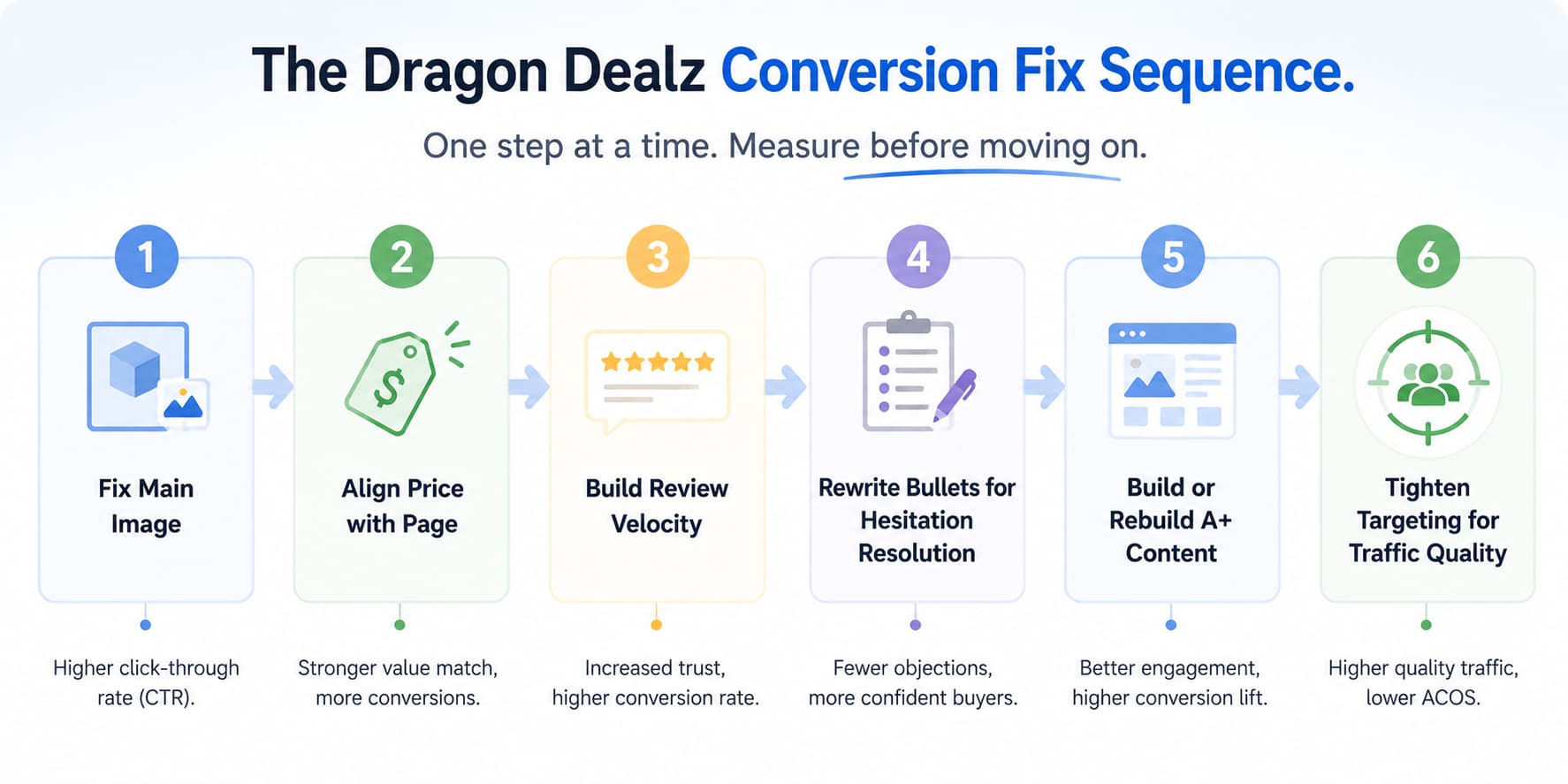
How to Fix Amazon Listing Conversion Rate Problems — The Right Sequence
Work through these in order. Fixing the copy before fixing the main image improves the interior of a house with a broken front door.
Step 1 – Fix the Main Image Before Anything Else
Open Amazon in incognito mode. Search your primary keyword. Compare your main image to the top 5 results in the search row at thumbnail size. If yours doesn’t hold up in that comparison, a new main image is your first investment.
A main image that converts well at thumbnail size is:
- Pure white background at RGB 255, 255, 255, not off-white, not light grey
- Product fills at least 85% of the image frame
- Shot at an angle and with lighting that communicates quality and clarity
- Free of text, watermarks, props, and lifestyle elements in the main image slot
Step 2 – Align Price With the Page Average
Search your keyword in incognito and note the price of the top 5 organic results. If your price is more than 15 to 20% above the page average with a similar review count, either adjust the price or build a listing that substantially justifies the premium before raising it.
A temporary price reduction while you build reviews and improve other listing elements is a legitimate strategy. Holding a premium price on a listing that hasn’t yet established the trust to support it is not.
Step 3 – Build Review Velocity to Close the Social Proof Gap
If your review count is below 25 and the category average for top performers is significantly higher, review velocity is your next priority after image and price:
- Amazon Vine: enroll if the brand is registered with fewer than 30 reviews generates up to 30 protected reviews from vetted reviewers
- Native Request a Review button: use for every eligible order in the 5 to 30 day window that comes from Amazon, not you, with no solicitation risk
- Respond to every negative review: shows future buyers the seller is engaged and accountable
Step 4 – Rewrite Bullets to Close Specific Buyer Hesitations
Review your one and two-star competitor reviews. They contain a precise list of the hesitations buyers have before purchasing in your category. Rewrite your bullets to address those hesitations directly, leading with the outcome the buyer wants rather than the feature you’re describing.
At least three of your five bullets should answer a specific buyer concern. The other two can describe key features, but even those should connect the feature to a buyer-relevant outcome.
Step 5 – Build or Rebuild A+ Content Around Remaining Buyer Questions
If you’re brand registered and don’t have A+ content, create it. If your A+ content is just reformatted bullets, rebuild it around the questions buyers have after reading your title and bullets, the ones that aren’t answered by the copy above.
Use A+ modules to address comparison questions, demonstrate use cases, establish brand credibility, and answer the category-specific concerns that drive the final purchase hesitation in your product type.
Step 6 – Tighten Campaign Targeting to Improve Traffic Quality
After improving the listing, audit your search term report for the last 60 days. Add every high-spend, low-conversion search term as a negative keyword. Shift budget toward exact-match campaigns on your 3 to 5 highest-converting terms.
Better traffic quality directed at a better-converting listing produces a compounding improvement in unit session percentage that neither change produces alone.
What Most Sellers Get Wrong With Amazon Pricing and Conversions
They Change Multiple Things at Once and Learn Nothing
When sessions are high and orders are low, the temptation is to update the image, rewrite the bullets, adjust the price, and add A+ content all in the same week. If conversion improves after simultaneous changes, you have no idea which one caused it. If it doesn’t improve, you have no idea what to revert.
Single-variable testing over 7 to 10-day windows produces real learning. Batch changes produce noise that makes the next decision harder, not easier.
They Optimize for What Looks Good Instead of What Converts
A listing that looks polished and complete to the seller often still doesn’t convert because it was optimized for aesthetics rather than buyer psychology. The question to apply to every listing element is not “Does this look good?” It’s “Does this reduce a specific hesitation for a buyer who has never heard of this product before?”
Those are different questions with different answers. The second one builds conversion rate. The first one builds a listing the seller is proud of, but buyers still leave.
FAQs
not buying
Something at a specific stage of the buyer decision process is creating enough friction to prevent the purchase. Check unit session percentage, identify whether the gap is trust, price, copy, or traffic quality, and fix the specific stage that’s failing.
Most categories average 10% to 15%. Below 8% indicates a specific listing problem worth investigating. Above 15% is strong and suggests the listing is ready to scale with additional traffic.
Not always. If traffic is from broad-match or auto campaigns, irrelevant buyer intent may be the cause. Confirm traffic source quality before assuming the listing needs to change.
Main image and price changes typically show results in 7 to 14 days. Bullet rewrites and A+ content improvements take 2 to 3 weeks to reflect in the unit session percentage.
Yes. Review count is a primary trust signal. Buyers comparing listings on the same search page consistently choose the one with more established social proof when price and image are comparable.
Views Without Purchases Are Just Wasted Traffic
Customers viewing your product but not buying is not an unsolvable problem. Every conversion gap traces back to a specific stage in the buyer decision funnel — a first impression that didn’t build confidence, a price that created friction, a social proof gap that raised doubt, copy that described instead of resolving hesitations, or traffic that wasn’t the right buyers in the first place.
Fix the main image first. Align the price with the page. Build review velocity through compliant channels. Rewrite bullets to close buyer hesitations rather than list specifications. Add A+ content that answers the questions bullets can’t reach. Tighten targeting so the sessions you’re generating are from buyers who actually want what you sell.
Work through the sequence one step at a time. Measure after each change. Build on what works.
And if the conversion rate still isn’t moving after a full round of targeted fixes, Dragon Dealz is ready to find exactly which stage is holding it down.