support@dragon-dealz.com
 +1 (888) 303-8337








Introduction
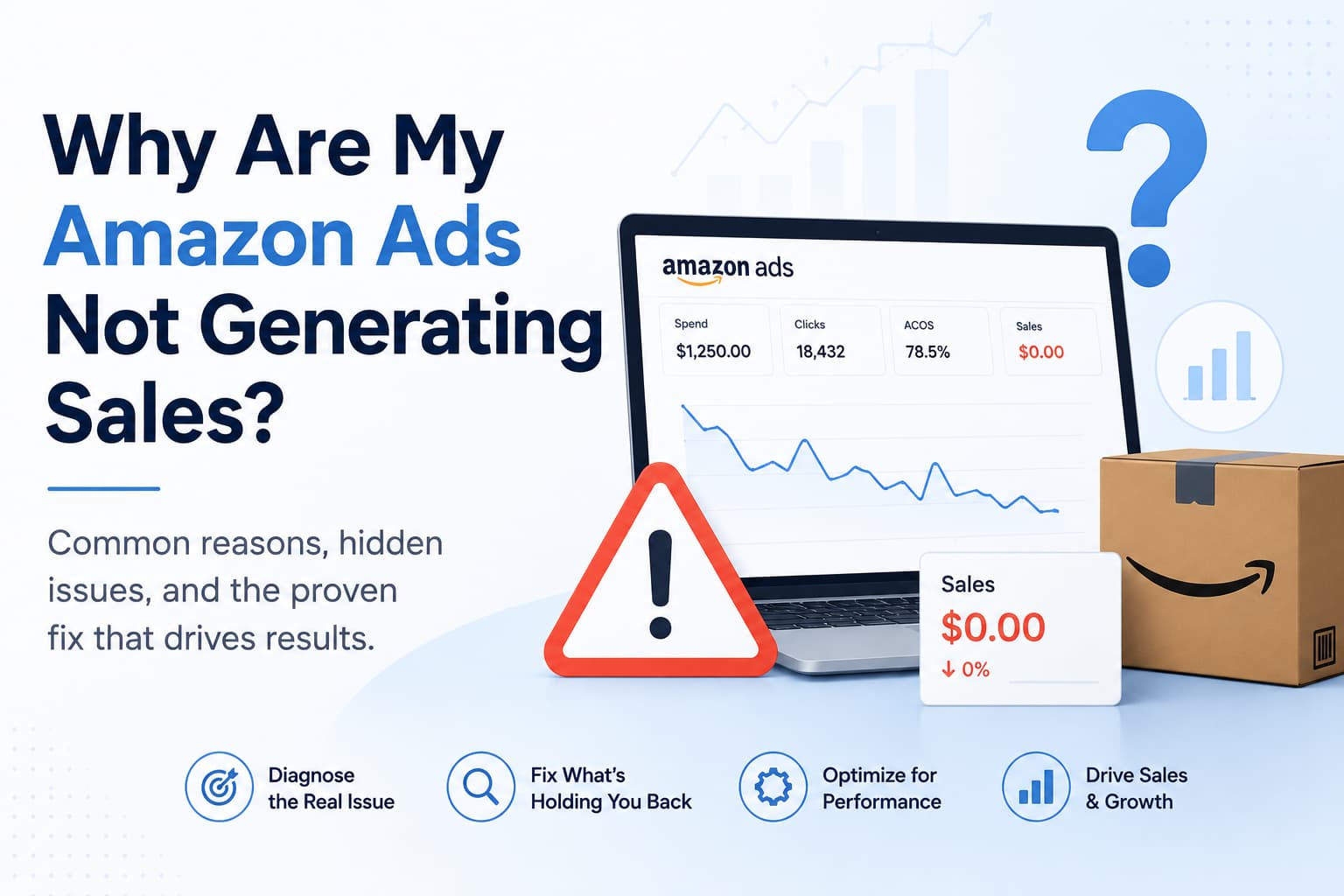
The budget is going out every single day.
Impressions are showing. Clicks are happening. The campaigns look active from the inside. But actual sales aren’t following, and the ACOS number climbing in your dashboard is starting to feel like a bill you’re paying with nothing to show for it.
If your Amazon ads are not generating sales, the instinct is usually to raise bids, increase budget, or switch targeting strategies. Almost always, that makes things worse before it makes things better. Because the real problem in most cases isn’t the ads at all.
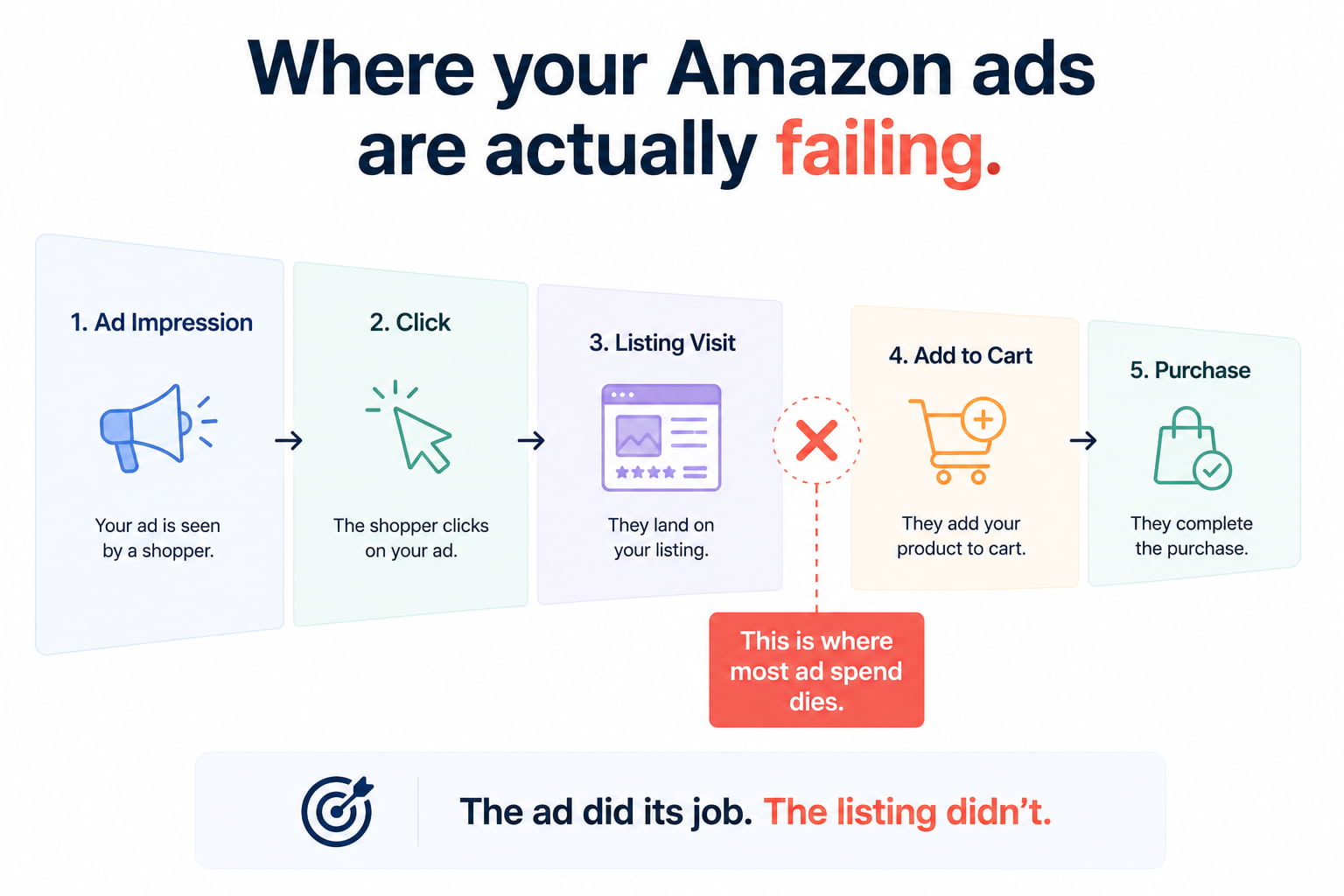
Amazon ads bring buyers to your listing. That’s the only job they do. What happens after the click, whether the buyer adds to the cart or leaves, is entirely the listing’s responsibility. And in most cases where ads are spending without selling, the gap is somewhere between the click and the purchase, not in the campaign settings.
This page breaks down exactly why your Amazon advertising campaigns are failing, how to figure out which type of failure you’re dealing with, and the right sequence to fix it without burning more budget on a foundation that isn’t ready to convert.
Are Your Amazon Ads Failing or Is Your Listing Failing?
This is the most important question to answer before touching anything. Most sellers treat an ad problem and a listing problem the same way and apply the wrong fix to both.
Pull two numbers from Business Reports in Seller Central. Go to Detail Page Sales and Traffic by Child Item:
- Sessions — total visits to your listing from all sources
- Unit Session Percentage — percentage of those visits that resulted in a purchase
Now look at your PPC dashboard and note your click-through rate (CTR) and ACOS alongside those numbers.
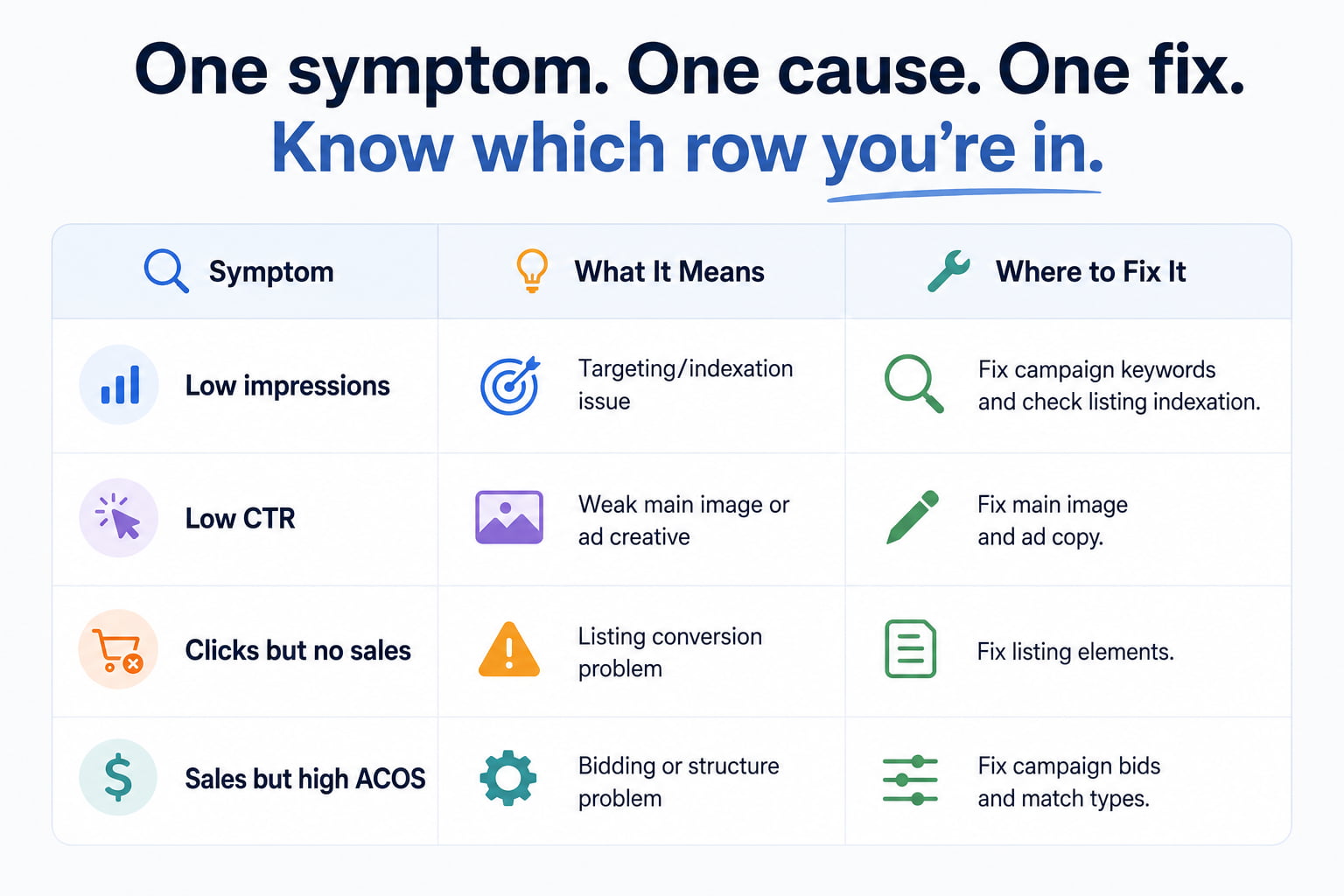
Here’s how to read what you find:
- Low impressions despite active campaigns: targeting or indexation problem — the ad isn’t reaching buyers
- Good impressions, low CTR: the ad creative or main image isn’t compelling enough to earn the click
- Good CTR, sessions arriving, but unit session percentage below 8%: listing conversion problem — the ad is working, the listing isn’t
- Good CTR and reasonable unit session percentage, but ACOS above 50%: bidding or campaign structure problem
Each of those patterns has a different fix. Identifying which one you’re looking at before making changes is what separates a fast recovery from months of trial and error.
Why Your Amazon Advertising Campaigns Are Not Converting — The Real Causes
There are six distinct reasons Amazon ads are not generating sales despite active spend. Most sellers have two or three of them running simultaneously, which is why the problem can feel impossible to untangle without a clear framework.
Cause 1 – Your Listing Can’t Convert the Traffic You’re Paying For
This is the most common cause of Amazon PPC performance problems and the most consistently misdiagnosed one.
When a buyer clicks your Amazon sponsored ad, they land on your product detail page. At that point, the ad has done everything it can do. The listing takes over. If the main image looks weak next to competitors, the price seems high for what’s offered, the review count is in single digits, or the bullet points list features without answering buyer questions, the buyer leaves. The click cost was real. The sale never happened.
Signs your listing is the conversion problem:
- Unit session percentage below 8% with consistent ad traffic
- Main image that doesn’t stand out at thumbnail size in search results
- Price noticeably above the page average for your primary keyword
- Fewer than 15 to 20 reviews or a star rating below 4.2
- Bullet points that describe specifications rather than answering buyer hesitations
Running more Amazon ads behind a listing that isn’t converting just produces faster losses. The listing ceiling has to be raised before the ad spend can produce profitable returns.
Cause 2 – You’re Targeting the Wrong Search Terms (Relevance Problem)
Amazon PPC campaigns fail to generate sales when the buyers seeing your ads weren’t actually looking for your product. This happens when broad-match and auto campaigns match your ads to search terms that are adjacent to your keywords but not genuinely relevant to what you sell.
A buyer who searched for something loosely related to your product clicks the ad because the thumbnail looked relevant enough to check. They arrive on the listing, immediately see it’s not what they wanted, and leave without buying. Your account records an impression, a click, a cost, and zero conversion.
This pattern produces the exact symptom sellers describe as Amazon ads getting clicks but no sales. The clicks are real. The buyers weren’t the right ones. The fix is in the campaign, not the listing: tighter match types, aggressive negative keyword addition based on your search term report, and shifting budget toward exact-match campaigns on terms where you’ve already seen conversions.
Cause 3 – Your Bids Are Disconnected From Actual Performance Data
A lot of sellers set bids based on Amazon’s suggested range at launch and then leave them alone for weeks or months. That’s not a bidding strategy. It’s a guess that compounds into wasted spend over time.
Effective Amazon PPC optimization requires keyword-level bid management based on actual conversion rate and ACOS data for each term. A keyword converting at 18% can support a much higher bid than a keyword converting at 4%. If both sit on the same bid, you’re overpaying on poor performers and almost certainly underpaying on your best ones, which means competitors outbid you on the terms that actually sell.
Download your search term report. Sort by spend. For every term with meaningful spend, check its conversion rate. The terms converting well deserve higher bids. The terms spending without converting deserve lower bids or pausing entirely.
Cause 4 – Your Campaign Structure Is Creating Waste You Can’t See
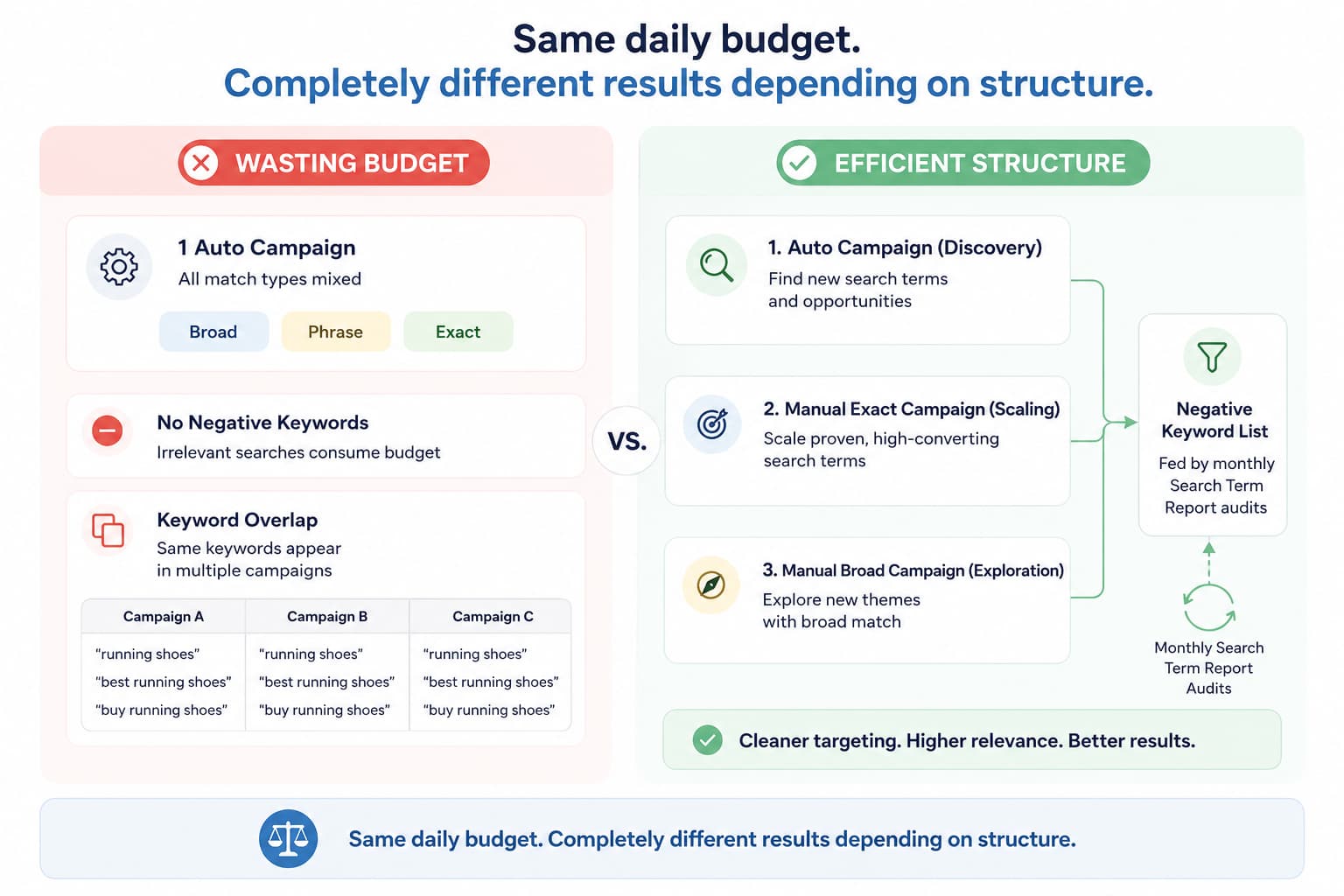
Poorly structured Amazon advertising campaigns are one of the most reliable ways to spend money without generating proportional sales. The most damaging structural problems:
- Running broad, phrase, and exact match keywords in the same ad group makes it impossible to control spend at the individual keyword level
- Running only auto campaigns and expecting them to produce profitable returns, auto campaigns are discovery tools, not scaling tools
- No negative keyword discipline, which means Amazon keeps matching your ads to irrelevant search terms and charging you for the traffic
- Multiple campaigns targeting the same keywords at different bids, which causes your ads to compete against themselves and drives up your own costs
Each of these structural problems bleeds budget in ways that aren’t obvious from the top-level campaign dashboard. The wastage only becomes visible when you dig into the search term report and see how many clicks are going to irrelevant or low-converting terms.
Cause 5 – Your Ad Creative Isn’t Earning the Click (CTR Problem)
If your Amazon sponsored ads have strong impressions but a low click-through rate, the ad itself isn’t compelling buyers to click. On Sponsored Products, the ad creative is essentially your main listing image plus your title and price as they appear in search results. If your main image doesn’t stand out at thumbnail size next to four or five competitors, buyers skip past it even when your product is exactly what they need.
A low CTR means you’re paying for impressions that aren’t generating visits. It also signals to Amazon’s relevance system that buyers aren’t finding your ad compelling for that search query, which over time reduces your impression share and increases the bid needed to maintain visibility.
The fix is almost always the main image. A product photograph that looks professional, clear, and visually distinct from competitors at thumbnail size dramatically improves CTR, which reduces cost per click and improves the overall Amazon advertising ROI for the same keyword.
Cause 6 – You Lost the Buy Box on a Shared ASIN
This is a less common but highly impactful cause of Amazon ads not working that catches sellers completely off guard.
If you share your ASIN with other sellers and one of them has taken the Amazon Buy Box from you, your ads may still generate impressions and clicks, but the buyer who arrives sees a different seller’s offer in the purchase position. They may buy from that seller rather than from you. Your ad generated the traffic. Someone else got the sale.
Check your Buy Box ownership percentage in Business Reports. If it has dropped significantly alongside your Amazon PPC performance decline, Buy Box recovery — through repricing, FBA enrollment, or account health improvements — needs to happen before any ad optimization will produce the results you’re looking for.
What Amazon Ads Not Working Is Costing You Beyond Wasted Spend
The obvious cost is the ad budget itself. If you’re spending $75 per day on campaigns that aren’t converting, that’s $2,250 per month of direct cash outflow producing minimal returns.
But the less visible cost is what’s happening to your listing while the underperforming ads run. Here’s the compounding damage:
- Every non-converting click sends Amazon’s algorithm a signal that your listing underperforms for that keyword
- Over time, Amazon reduces your organic visibility for those keywords because the conversion data suggests buyers don’t want your product when they find it.
- Lower organic rank means you need more ad spend to maintain visibility
- More ad spend on a listing that still isn’t converting produces the same result at a higher cost
- The ACOS climbs, the margin compresses, and the listing’s long-term organic position quietly deteriorates
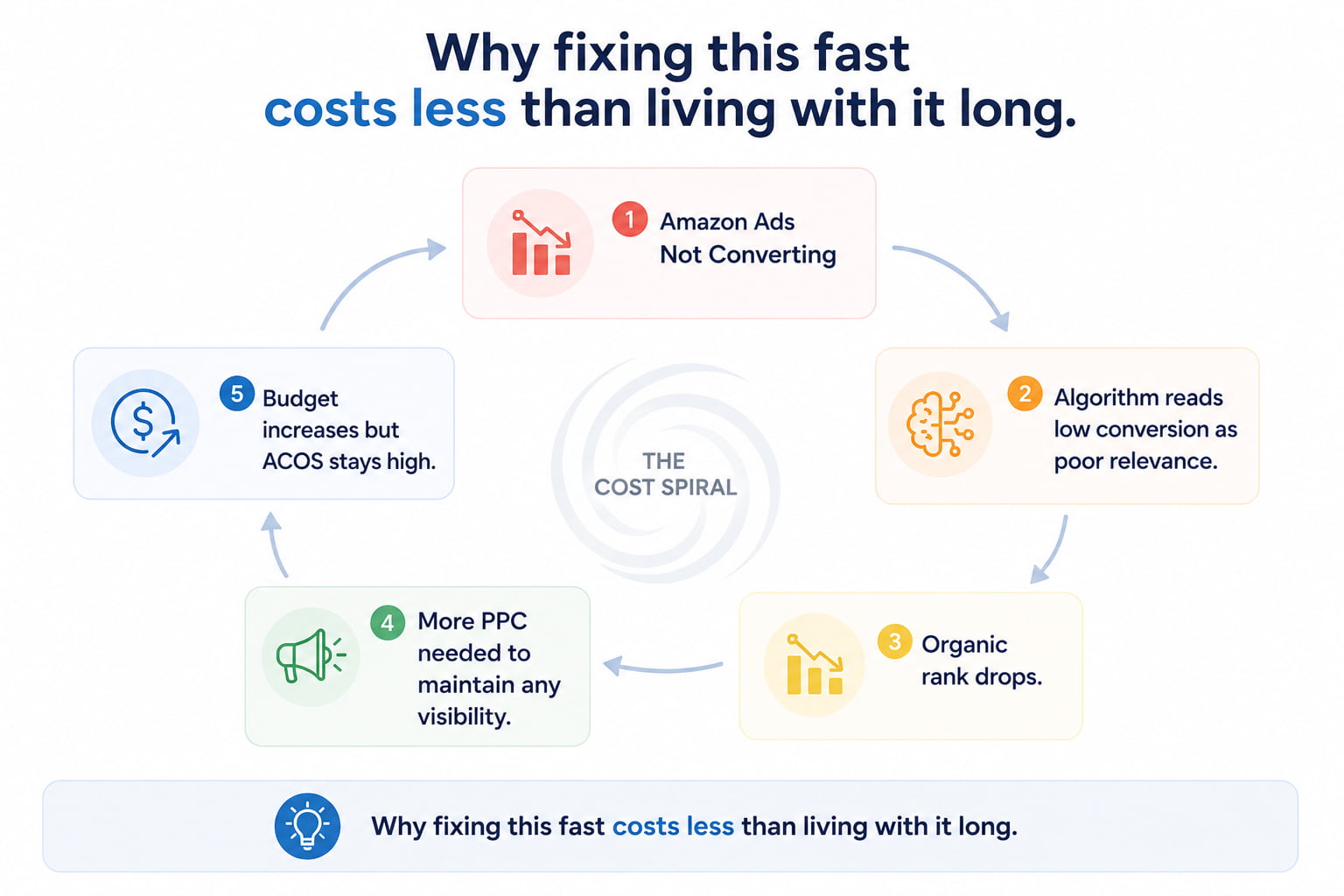
The seller who fixes the conversion problem in week two loses far less than the seller who spends three months trying to optimize bids on a listing the algorithm is already deprioritizing.
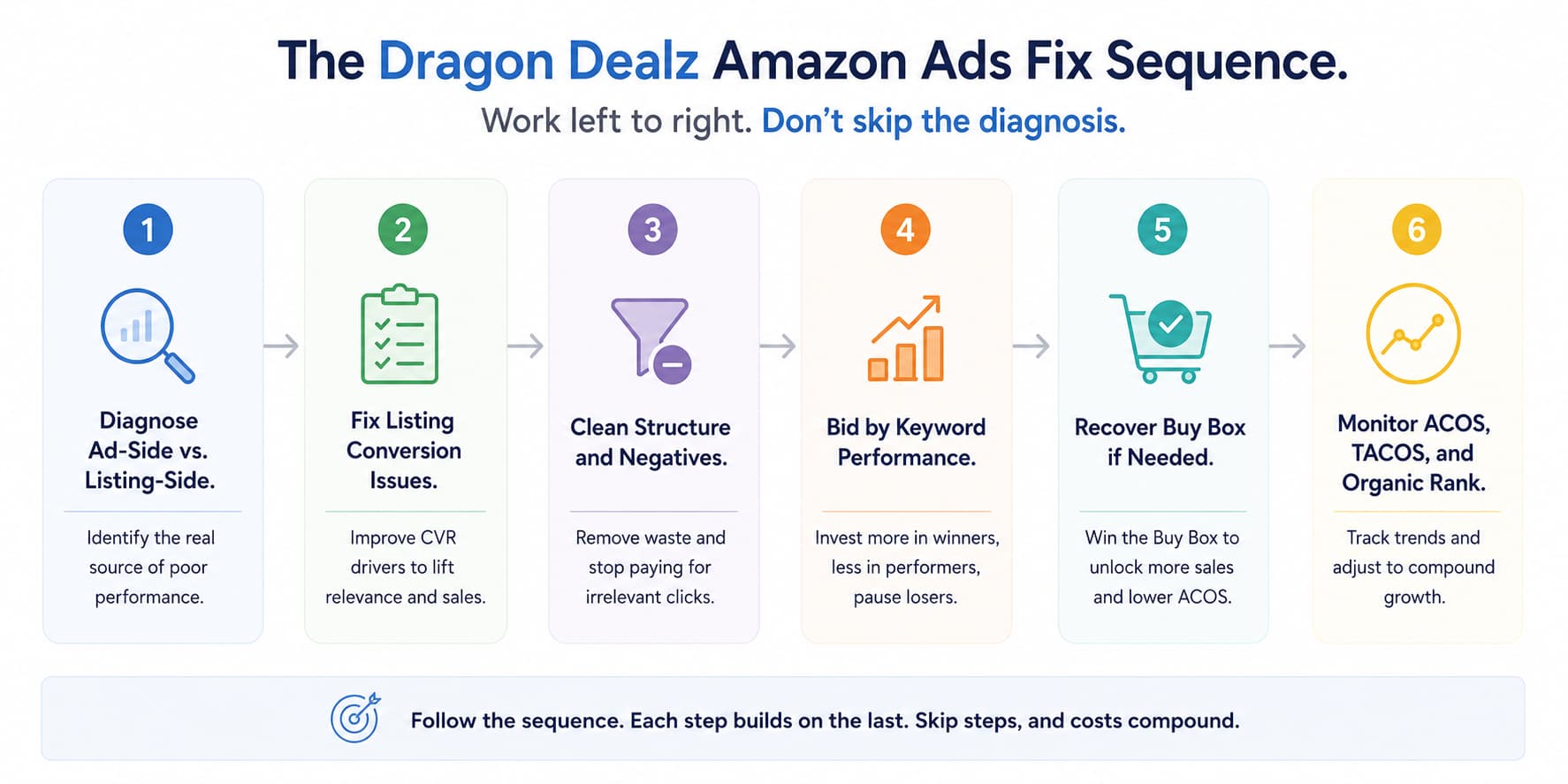
How to Fix Amazon Ads Not Generating Sales — The Right Sequence
Work through this sequence in order. Adjusting bids before fixing the listing is treating the symptom while the cause keeps compounding.
Step 1 – Diagnose Ad-Side vs. Listing-Side Failure First
Pull your unit session percentage from Business Reports and your CTR from the PPC dashboard. If the unit session percentage is below 8%, the listing is the primary problem. If CTR is below 0.3% to 0.4% on Sponsored Products, the ad creative is the issue. If both look reasonable, but ACOS is high, the campaign structure needs attention.
Fix the lowest-performing layer first before moving to the next.
Step 2 – Fix the Listing Before Scaling Any Ad Spend
If the unit session percentage is below 8%, stop increasing the ad budget until the listing is fixed. Address in this order:
- Main image: confirm it stands out at thumbnail size next to competitors in an incognito search
- Price: check it against the page average for your primary keyword
- Reviews: if below 20, prioritize review velocity through Vine and the native Request a Review button
- Bullet points: rewrite each one to lead with a buyer benefit rather than a product specification
Each change needs 7 to 10 days of measurement before the next one is made.
Step 3 – Clean Up Campaign Structure and Negative Keywords
Download your search term report for the last 60 days. Filter for high-spend, low-conversion terms. Add every one of those to your negative keyword list as exact match negatives.
Separate your match types into distinct ad groups or campaigns so bid control at the keyword level is possible. Move converting search terms from auto campaigns into exact-match manual campaigns. Pause any campaigns targeting keywords where you have zero conversions after meaningful spend.
This single step, negative keyword cleanup, typically reduces wasted spend by 20 to 35% immediately without touching bids or budgets.
Step 4 – Set Bids Based on Keyword-Level Performance Data
Sort your search term report by spend. For every term spending more than $5 in the last 30 days, check its conversion rate and ACOS individually.
- Conversion rate above category average and ACOS within target: raise bid 15 to 20%
- Conversion rate below average and ACOS above target: lower bid 20 to 30%
- Zero conversions after meaningful spend: pause and add as negative
Review weekly for the first 60 days. Monthly reviews are sufficient for stable, mature campaigns.
Step 5 – Check and Recover Buy Box If Relevant
If your listing is shared with other sellers, check the Buy Box ownership percentage in Business Reports. If it has dropped, address account health metrics first, then reprice competitively within your margin floor.
If you’re FBM competing against FBA sellers, the structural disadvantage in Buy Box eligibility may require an FBA enrollment decision rather than a pricing adjustment.
Step 6 – Monitor ACOS, TACOS, and Organic Rank Together
Once structure and listing are both fixed, monitor Amazon PPC performance across three metrics weekly: ACOS for ad efficiency, TACOS for overall advertising investment as a percentage of total revenue, and organic rank for your top 5 keywords to confirm the ad spend is feeding organic momentum rather than just generating isolated sales.
A TACOS that’s declining over time while organic rank improves is the clearest signal that your Amazon advertising ROI is working the way it should.
What Most Sellers Get Wrong When Amazon Ads Are Not Profitable
They Increase the Budget When They Should Be Fixing the Foundation
When sales aren’t coming from ads, the instinct is to spend more to get more. But increasing the budget on campaigns that aren’t converting doesn’t generate more sales. It generates more impressions, more clicks, and more spend on a listing that still has the same conversion problem it had before the budget increase.
More budget amplifies whatever your current conversion rate produces. If that rate is 3%, a larger budget produces more 3% conversion at a higher cost. Fix the conversion rate first. Then scale the budget.
They Optimize Individual Keywords Without Fixing Campaign Structure
Raising and lowering individual keyword bids while leaving the underlying campaign structure broken is like adjusting the temperature on a leaking radiator. The structural problems, mixed match types, no negatives, and campaigns competing against each other keep producing waste that individual bid changes can’t overcome.
Fix the structure first. Then optimize within it.
FAQ
not generating
Almost always a listing conversion problem. Check unit session percentage in Business Reports — if it’s below 8%, the listing is the issue, not the campaigns.
Low CTR means the ad creative isn’t earning clicks. Good CTR but low unit session percentage means the listing isn’t converting. Both need separate fixes.
High ACOS with decent sales usually means bids are too high on low-converting terms, or the campaign structure is causing self-competition. Download the search term report and audit spend at the keyword level.
Reduce the budget on broad and auto campaigns to limit wasted traffic. Keep exact-match campaigns running at lower bids to maintain visibility and data collection while the listing is being fixed.
Negative keyword cleanup and bid adjustments typically show results within 1 to 2 weeks. Listing fixes take 2 to 3 weeks to reflect in the unit session percentage. Full ACOS stabilization usually takes 30 to 45 days.
Ads Should Build Your Business, Not Just Drain Your Budget
Amazon ads not working is a solvable problem. Every case of campaign spending without selling traces back to one of six specific causes, and every one of those causes has a clear, sequenced fix.
Diagnose the right layer first. Fix the listing before scaling spend. Clean up campaign structure and negative keywords. Set bids by keyword-level data, not guesswork. Monitor ACOS, TACOS, and organic rank together so your Amazon advertising campaigns are building long-term rank momentum, not just generating isolated transactions.
Work through the sequence. Measure after each step. And if the numbers still aren’t moving after a full round of targeted fixes, the problem almost certainly needs a deeper audit than self-service optimization can reach.
Dragon Dealz is ready to run that audit with you — from campaign structure to listing conversion to Buy Box recovery — and build the fix plan around what’s actually broken.